Launch rich WhatsApp campaigns faster with 500+ industry-ready templates
Customize, connect, and deploy branded WhatsApp messages through your preferred provider. Beautiful, interactive campaigns, without building everything from scratch.
Template packs built for every industry
SMS just grew up. Meet WhatsApp Business Platform.
The WhatsApp Business Platform is Meta's official way for businesses to message customers on WhatsApp. Instead of plain gray texts from an unknown number, you send branded, interactive, media-rich messages from your business profile, as a chat in WhatsApp itself.
- · Plain text, 160 characters, no branding
- · Shady-looking short links
- · No images, buttons, or interactivity
- · You can't tell who really sent it
Hey Jordan, the pieces you saved are 30% off for 48 hours. Tap to shop before they sell out.
9:41- · Verified, branded sender
- · Images, carousels & buttons
- · Two-way, app-like conversations
- · Read receipts & rich analytics
A complete concierge flow, start to finish
One WhatsApp thread handles check-in, two-way questions, upsells, and bookings: an app-like experience inside WhatsApp, with no separate app for guests to install.
A branded rich card delivers the room and a tap-to-unlock key.
Quick-reply buttons turn questions into instant, structured answers.
Late checkout and spa offers, booked right in the thread.
Hand off to staff the moment a guest needs a person.
One messaging channel. Endless use cases.
From sold-out events to five-star stays, WhatsApp Campaigns gives every team a head start. Browse a few of the journeys you can launch today.
A searchable library of 500+ designed templates
Browse by industry, campaign goal, tone, provider, and use case. Preview a template, make it yours, and launch, all in one streamlined workflow built for marketing teams.
Doors open an hour early just for you, {{first_name}}: front-row keynote, lounge access, and a 4pm surprise drop. Lock in VIP before midnight.
9:41VIP Early-Bird Drop
Welcome, {{first_name}}! Your suite for {{check_in}} is confirmed and your mobile key is one tap away. Add a sunset-view upgrade?
9:41Booking Confirmed
You've sent 3,200 messages this month, {{first_name}}. Keep the momentum, upgrade for more, or chat with us in a tap.
9:41Renewal Reminder
Because of you, {{first_name}}, 240 families ate this week. See their faces, and double your impact before Friday's match ends.
9:41Donor Impact Story
{{first_name}}, the pieces you keep coming back to are on sale till Sunday midnight. Shop your favorites before they sell out.
9:41Weekend Flash Sale
Hi {{first_name}}, scope, timeline, and pricing are all in here. Review it in two minutes and grab a time to kick off.
9:41Proposal Follow-Up
You're booked with Dr. Patel on {{date}}. Confirm in a tap, or pick a new time from the next open slots, no phone tag required.
9:41Appointment Reminder
Good news, {{first_name}}! Order #{{order_id}} is on the truck and arriving by {{eta}}. Follow it on the map or tell us where to leave it.
9:41Order On Its Way
Use this code to sign in, {{first_name}}. It expires in 10 minutes. Northbank will never ask you to share it. The ✓ badge confirms it's really us.
9:41Verified Login Code
We spotted a $482.19 charge at TechMart, {{first_name}}. If it was you, tap to approve; if not, block your card instantly, right from here.
9:41Card Activity Alert
We hope the Ocean Suite treated you well! Tap a rating below, and if anything fell short, tell us and we'll make it right before you check out.
9:41Rate Your Stay
Swipe through this season's arrivals, {{first_name}}. Tap any piece to see sizes and check out without ever leaving the chat.
9:41Shop the New Collection
500+ ready-made templates
A searchable library covering every campaign you can imagine.
Industry-specific packs
Curated bundles built for your vertical, out of the box.
Drag-and-edit customization
Swap copy, colors, and media without touching code.
Rich cards & actions
Buttons, carousels, images, and quick replies built in.
Provider-ready exports
Export clean payloads for your messaging provider.
Campaign-ready copy
Persuasive, on-brand layouts written to convert.
Team-friendly workflow
Share, duplicate, and ship together in one place.
Fast launch
Go from idea to live campaign in minutes, not weeks.
Build once. Connect any provider.
WhatsApp Campaigns is provider-flexible. Design your templates one time, then connect them to the backend that fits your stack. Switch or add providers whenever you need to.
Skip the approval maze. Launch in days, not weeks.
Getting a WhatsApp campaign live means clearing Meta's template review and category decision, Meta's consent and messaging policies, and each provider's own content rules: an opaque process where a single missed detail sends you back to the start. WhatsApp Campaigns streamlines it using patterns from campaigns that are already approved.
Why WhatsApp campaigns get stuck
Meta template review
Every template you send to start a conversation has to be approved by Meta first, and Meta decides its category. A Utility template can come back approved as Marketing, which quietly changes where it can deliver.
Category can changeConsent & policy rules
Meta requires active, per-number opt-in and enforces its messaging policies. Purchased lists, missing opt-outs, or a promotional ask dressed as Utility can get templates rejected or a sender limited.
Enforced per senderProvider-specific requirements
Twilio, Meta, and other providers each have their own submission formats, content policies, and opt-in proof. Miss a detail and you're back in the queue for another round.
Different per providerApprovals built on what already works
Instead of guessing what Meta's reviewers want, you start from templates shaped by campaigns that have already cleared review. The branding, opt-in language, and message structure are already aligned with what gets approved, so you submit with confidence and spend far less time in rejection loops.
- Modeled on similar, already-approved campaigns
- Fewer rejections and resubmissions
- Submission formatted correctly per provider
- Hands-on support to resolve reviewer flags
- 1
Start from a pre-vetted template
Your campaign is built on a structure modeled after similar campaigns that have already been approved: content, branding, and opt-in patterns reviewers expect.
- 2
Submit against a guided checklist
We map your template to each reviewer's requirements up front, so the category, sample values, and opt-in language are complete before you submit.
- 3
Clear Meta's review
Submissions go in the right format for each provider, with the category you mean pinned, reducing the rejection-and-resubmit loops that cause most of the delay.
- 4
Go live with support
If a reviewer flags something, we help you resolve it directly with the provider, so you reach live status without losing weeks to back-and-forth.
Approval decisions and template categories are set by Meta, and each provider applies its own rules. WhatsApp Campaigns can't guarantee approval, but a pre-vetted, correctly-formatted submission is the single biggest lever for getting through review faster.
See what Meta actually approved, not just that it did
Utility and Marketing aren't a label you pick, they're a rule Meta enforces, and getting it wrong doesn't bounce your submission, it quietly breaks delivery months later.
Utility and Marketing look alike
A confirmation and a feedback request can share almost the same words, but WhatsApp treats them completely differently. “Your order is out for delivery” is Utility. “How was your delivery?” is Marketing, even naming the same order, because it's the business asking for something rather than delivering something the customer needs.
Same order, different categoryMeta can re-file your category
Submit a template as Utility and Meta's own review can still approve it as Marketing. Most template tools show only “Approved,” so the re-filing is invisible until sends start failing.
Even when Utility is requestedA blocked category fails silently
Marketing-category templates are currently blocked from delivering to US numbers outright. If your template was quietly re-filed as Marketing, every cold send to a US customer disappears with no obvious reason why.
US delivery, blockedThe real category, on every template
Every template shows the category Meta actually approved, color-coded, right next to the approval status. If a Utility submission comes back re-filed as Marketing, you see it immediately instead of finding out from a run of failed sends.
- Meta's real, final category shown on every template
- A clear warning the moment a re-filing happens
- Utility submissions are pinned so Meta can't silently swap the category
- Delivery status and rejection reason in one place
“Your order #4471 is out for delivery, arriving by 3pm.” A message the customer needs, tied to something they already started.
“How was your delivery experience?” Naming the same order doesn't change what it is: a request that serves the business, not the customer.
Category rules and the current US Marketing block are set by Meta and can change. WhatsApp Campaigns can't guarantee a category holds, but showing you the real one the moment it's decided is what turns a silent failure into something you can fix.
Go from templates to intelligent campaigns
Pro turns your template library into a personalized, AI-powered messaging engine, no full engineering team required.
Upload CSV, personalize everything
Map customer variables in seconds.
Personalize messages with names, dates, booking details, offers, event info, and any custom field you bring.
AI automated responses
Let AI answer every reply, 24/7.
Let AI answer customer responses, route questions, suggest next actions, or hand off to a human at exactly the right moment.
Conversation flows
Multi-step journeys that respond, branch, and follow up.
Chain templates into automated journeys: drip campaigns, reminders, re-engagement, and concierge experiences. Each step can wait, branch on the customer's reply, or let AI take over. Start from 100+ ready-made flows across every industry.
Build smarter campaign flows, branching journeys, triggers, and AI conversations, without needing a full engineering team.
AI that answers from your knowledge base
Connect your FAQs, policies, listings, and docs. The AI replies to WhatsApp messages with accurate, grounded answers, suggests the next action, and hands off to a human when needed.
FAQs, policies, listings, menus, and docs: your content becomes the source of truth.
Replies are pulled from your knowledge base, not guessed, so guests get the right answer.
Book, upgrade, reschedule, or pay: the AI turns answers into one-tap actions.
When a question needs a person, it escalates to your team instantly.
Explore AI Ambassador, purpose-built AI experiences for events, vacation rentals, hotels, and nonprofits.
Collect feedback with one-tap WhatsApp surveys
Turn post-visit follow-ups into conversations people actually finish. WhatsApp surveys deliver branded, tappable questions — ratings, scales, and polls — right in the messaging app, where response rates leave email forms behind.
Respondents answer with buttons and quick replies, not by typing into a form. Less friction means more completed surveys.
Surveys land in the messaging app people already read, from a branded sender they trust — routinely beating email questionnaires.
Star ratings, 1–5 scales, NPS, multiple choice, and review prompts — all delivered and answered inside the message thread.
Each answer chooses the next question, so every respondent gets a short, relevant path instead of one long form.
We're building a dedicated home for WhatsApp surveys — templates, branching flows, and reporting. Follow along at wa-surveys.com.
Now your templates are agent-native
Beyond a human dashboard: an authenticated gateway lets autonomous AI agents discover, author, clone, render, and send WhatsApp campaign templates programmatically — exposed as an MCP server, a CLI, and an embeddable client.
MCP server
wa-mcpProDrop the library into any MCP-capable agent
CLI
waProJSON in, JSON out — pipe it anywhere
Typed client
GatewayClientEmbed the gateway in your own code
Least-privilege keys, the same provider-approval gate as the human app, and packaged workflows from find-and-buy to campaign-in-a-box.
See how WhatsApp Campaigns works
Watch a quick walkthrough: choose a template, customize it, connect your provider, upload variables, and launch a campaign, start to finish in minutes.
Simple plans that scale with your campaigns
Start free, upgrade when you're ready to launch. Every plan is built to help marketing teams move faster.
Free
Explore the library and test WhatsApp ideas.
- Full access to 500+ templates
- 10 free WhatsApp sends to test
- Template previews & customization
- Community updates
Best for testing WhatsApp ideas
Pro
Everything you need to launch real campaigns.
≈ $0.10 per message
- 500 WhatsApp messages / month
- Full access to 500+ templates
- CSV variable uploads
- AI / LLM response handling
- Agent toolkit: MCP server, CLI & gateway keys
- Provider integrations
- Direct campaign submission to all providers, with support to resolve any issues
- Template customization
- Campaign-ready exports
Best for growing teams & agencies
Enterprise
Scale WhatsApp across brands, teams, and regions.
- Everything in Pro, plus:
- Custom template libraries
- Advanced provider setup
- Dedicated onboarding
- Team permissions
- Custom AI workflows & agent skill chains
- Priority support
Best for large brands & high-volume teams
Guides for sending on WhatsApp
Deliverability, template categories, and the flows that replace website visits.

Questions, answered
What WhatsApp Campaigns is and what it costs, how templates, approval, and delivery really work, and how AI agents use it. Search or browse.
Using WhatsApp Campaigns
What it is, what it costs, and how it works.What is WhatsApp Campaigns?
WhatsApp Campaigns is a library of 500+ ready-to-use WhatsApp campaign templates, spanning 80+ categories across 12+ industries, plus 100+ multi-step conversation flows. You customize a template, connect your messaging provider (Twilio and Meta today, or your own gateway), and launch branded campaigns without building each message from scratch. Pro adds CSV personalization, AI automated responses grounded in your knowledge base, and an agent toolkit (MCP server and CLI) so AI agents can run campaigns too.
What does WhatsApp Campaigns cost?
There are three plans: Free ($0), Pro ($49 per month), and Enterprise (custom pricing). Free includes full access to the 500+ template library plus 10 free sends to test. Pro includes 500 messages a month in the $49 (about $0.10 per message, with no separate per-message charge for those 500), CSV personalization, AI automated responses, conversation flows, the agent toolkit (MCP server and CLI), and provider integrations. Enterprise is for higher volumes and custom needs across brands, teams, and regions.
How many templates are included?
500+ professionally designed, campaign-ready templates spanning 80+ categories across 12+ industries (retail, hospitality, healthcare, events, real estate, finance, automotive, and more) plus 100+ ready-made multi-step conversation flows. Every template ships with polished copy, on-brand media, and the right buttons and quick replies already in place, so you start from something proven rather than a blank canvas. Full access to the entire library is included on every plan, including Free; Pro and Enterprise add personalization, AI automated responses, flows, and higher send volumes on top.
Do I need to be technical to use WhatsApp Campaigns?
No, it's built for marketing and ops teams, not developers. Every template is drag-and-edit: swap the copy, colors, images, buttons, and quick replies in a visual editor without touching code. When you're ready to send, you connect your provider once and reuse it for every campaign. Pro layers on CSV personalization (map fields like first name, booking date, or offer in a few clicks), multi-step conversation flows, and AI automated responses, all configurable by anyone on the team. Developers can go deeper via your provider's API if you want to, but nothing here requires it.
Which providers can I connect?
Twilio and Meta are active now, Vonage and Bandwidth are coming soon, and you can bring your own WhatsApp gateway and we'll help you wire it up. The key idea is build once, connect anywhere: you design and personalize your templates a single time, then point them at whichever backend fits your stack. Switch providers or add new ones whenever you need to, without rebuilding a thing.
Can I bring my own WhatsApp provider or number?
Yes. Bring-your-own-gateway is a core part of the design, so if you already have a WhatsApp provider or sender set up, you can connect it and keep your existing numbers and relationships. If you don't, you can start with one of our active integrations like Twilio or Meta. Either way you build and personalize your templates once and route them through whatever backend you choose, which keeps you in control and avoids lock-in.
Can I personalize templates for each recipient?
Yes. On Pro you can upload a CSV and map fields like first name, appointment date, order number, or a custom offer into any template in a few clicks, so every recipient gets a message that reads like it was written for them. Personalization works hand in hand with conversation flows and AI replies, which means you can tailor not just the first message but the whole back-and-forth. It's the difference between a generic blast and a message that feels one-to-one, at scale.
Can the AI actually reply to customers?
Yes. With Pro, an LLM grounded in your own knowledge base (FAQs, policies, listings, hours, pricing, and docs) can answer customer responses in your brand voice, around the clock. It handles real back-and-forth: answering questions, rebooking or updating reservations, routing inquiries, suggesting the right next action, and handing off to a human the moment a conversation gets complex or high-value. Pair it with conversation flows to trigger the right message at the right time, branch on how the customer replies, and follow up automatically, so conversations keep moving even outside business hours.
How long does it take to get a WhatsApp campaign approved?
Approval time depends on the reviewers, not on us: every template is reviewed by Meta, and each provider applies its own content and opt-in rules. A single missing detail, such as a sample message that doesn't match your use case or unclear opt-in language, can send a submission back to the start. WhatsApp Campaigns streamlines it: because your campaign starts from templates modeled on similar campaigns that are already approved, with branding, opt-in language, and message structure aligned to what reviewers expect, you submit correctly the first time and avoid most rejection-and-resubmit loops. We also help resolve any flags directly with the provider. We can't guarantee approval (that decision is Meta's and your provider's), but a pre-vetted, correctly formatted submission is the biggest lever for getting live faster.
How do I know which category Meta actually approved?
WhatsApp Campaigns shows it on every template: the category Meta actually approved, color-coded, with a clear flag the moment a submission comes back different from what you requested. That matters because Meta's review can approve a template you submitted as Utility as Marketing instead, and most tools only show "Approved."
Can I change a template after it's approved?
Yes, by duplicating it: fork the approved template into a fresh draft, edit the draft, and submit it for approval again. Drafts can be revised in place, and every revision re-runs the same validation that gates creation.
What's the difference between a template and a flow?
A template is a single message; a flow is a complete two-way conversation. In a flow, the customer taps a button or quick reply and the next message answers that specific choice, through to the booking or confirmation that follows. The library includes 100+ ready-made flows alongside the 500+ templates.
Can I run customer surveys over WhatsApp?
Yes. Conversational surveys deliver branded, tappable questions inside the chat: star ratings, 1–5 scales, NPS, multiple choice, and review prompts. Respondents answer with buttons and quick replies instead of typing into a form, and each answer chooses the next question, so everyone gets a short, relevant path.
WhatsApp Business Platform basics
Templates, categories, and how delivery really works.What is the WhatsApp Business Platform?
It is Meta's official way for businesses to message customers on WhatsApp at scale, through a provider such as Twilio or directly with Meta. Messages arrive as a chat from your business profile and can carry images, buttons, carousels, and quick replies. It is not the same as automating the consumer app or WhatsApp Web, which is against WhatsApp's terms and is the most common cause of bans.
Do I need an approved template to message customers on WhatsApp?
Yes, to start a conversation you need a template that Meta has approved. Once a customer replies, a 24-hour service window opens, and during it you can send free-form messages without a template. Outside that window, every message you send has to be an approved template.
What's the difference between Utility and Marketing templates?
A Utility template is a message the customer needs about something they already started, such as an order, a booking, an appointment, or an account action, and it names that specific thing. Marketing is everything else, including requests that fire right after a real interaction: "Your order #4471 is out for delivery" is Utility, while "How was your delivery? Tap to rate us" is Marketing. Meta enforces the category, and its review can approve a template you submitted as Utility as Marketing instead.
Can WhatsApp Marketing templates be sent to US phone numbers?
Not currently: as of our August 2026 guide, Marketing-category templates are blocked from delivering to US numbers. That is why a template that Meta re-files from Utility to Marketing can start silently failing every send to US customers while still showing "Approved." Check the category Meta actually approved, not just the approval status.
Why was my WhatsApp message accepted but never delivered?
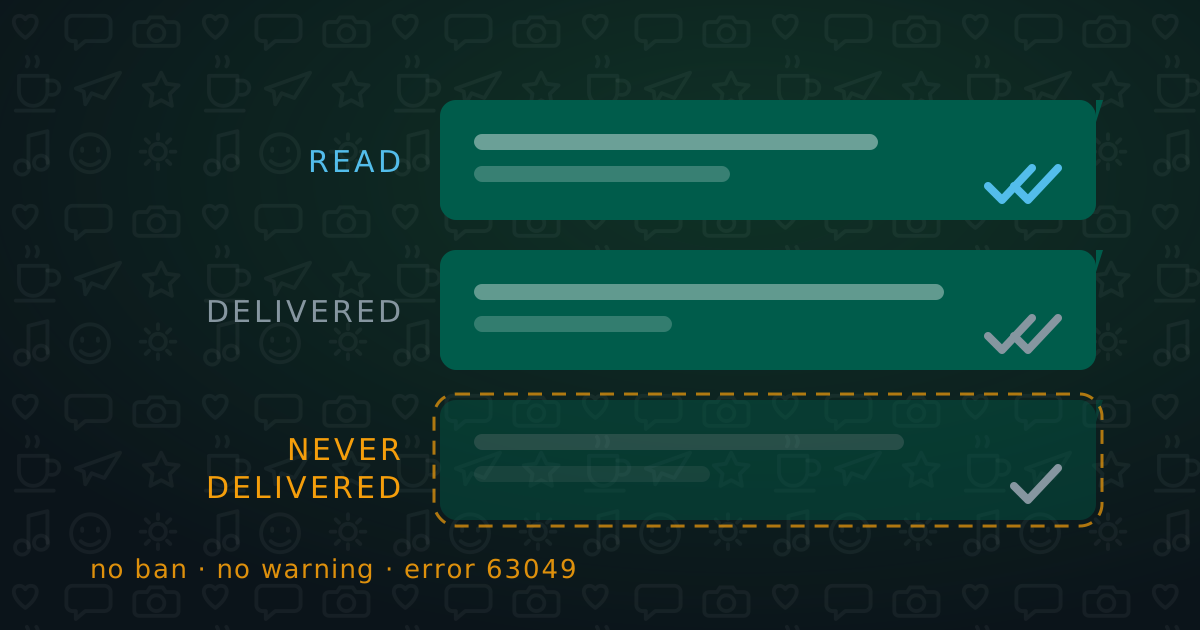
Usually because Meta throttled it or the recipient blocked you. Every user has a rolling limit on how many marketing template messages they will be delivered, counted across all businesses; when someone is over it, Meta accepts your message and quietly drops it (error 63049). A block looks similar: the message is accepted and sits at one tick, with no error. Sending the same campaign again to a silent list makes both worse.
What gets a WhatsApp Business account banned?
Policy violations, not volume. The main causes are sending through unofficial tools (QR-linked browser extensions, WhatsApp Web automation, or modified apps), messaging people who never opted in, dressing a marketing message as a Utility template, leaving the opt-out out of marketing messages, and prohibited content. On the official platform, with approved templates and real consent, a ban is unlikely and almost entirely within your control.
What is a WhatsApp quality rating?
It is Meta's green, yellow, or red rating of your sender, based mainly on blocks and reports from recipients over a rolling seven-day window. Yellow freezes your messaging limit while Meta looks, and usually clears after about a week of clean traffic; red can cut your limit and trigger an account review. A low rating also makes marketing throttling bite sooner, so it is the number to watch.
How should I warm up a new WhatsApp number?
Start small and grow over a few weeks. Send to the low hundreds first, increase gradually, and watch the quality rating rather than the calendar; if it turns yellow, stop increasing until it clears. A brand-new sender messaging tens of thousands of strangers on day one is exactly the profile that gets limited.
Why was my WhatsApp template rejected?
Most rejections come down to category, samples, or consent: a promotional ask written to look like a Utility message, sample messages that don't match the use case you declared, or opt-in language that isn't clear. Meta's reviewers specifically look for marketing dressed in transactional wording, so if a message is really a request (a review, a referral, a win-back), submit it as Marketing. A template can also be approved but re-filed into a different category, which never shows up as a rejection.
What is the 24-hour customer service window?
It is the 24 hours after a customer messages or replies to you, during which you can send free-form messages without a template. Messages inside the window are also exempt from the marketing delivery limit. Once it closes, you have to use an approved template again; a free-form message sent after the window fails with error 63016.
How many marketing messages can one person receive on WhatsApp?
Meta doesn't publish the number. Each person has a rolling limit on marketing template messages, counted across every business that messages them, and it is far tighter for people who never engage. Treat any exact figure you see quoted as illustrative, and watch your own error codes and reply rates instead.
What do the ticks on a sent WhatsApp message mean?
Two blue ticks mean the message was read, two grey ticks mean it was delivered, and a single tick means it was accepted but not delivered. A message that sits at one tick forever usually means the recipient blocked you or Meta throttled it, and neither produces an error code. You can't see who blocked you.
What do WhatsApp error codes 63049, 63024, and 63016 mean?
63049 means Meta declined to deliver a marketing message because the recipient is over their limit; don't resend the same template to that person. 63024 means the number isn't reachable on WhatsApp at all, which is list decay, not a problem with your sender. 63016 means a free-form message was sent after the 24-hour window closed; send an approved template instead. 63028 and 21656 are template variable problems, such as a missing merge field.
How do I send bulk WhatsApp messages without getting banned?
Send through the official WhatsApp Business Platform, with approved templates, only to people who opted in. Before each send, check that you can produce each recipient's opt-in wording, that the template's approved category is the one you meant, and that your sender's quality rating is green. Exclude contacts who ignored your last two campaigns, warm up new numbers gradually, and make sure you can stop a send mid-flight if it starts going wrong.
WhatsApp for business
Messaging customers as a brand.What's the difference between A2P and P2P WhatsApp?
P2P means person-to-person: two people chatting in their messaging apps. A2P means application-to-person: a business application sending messages to customers, like order updates, appointment reminders, or promotions. Business messaging on WhatsApp is A2P, which is why it carries the extra structure around it: verified brand identity, content review, opt-in requirements, and analytics. When this site talks about marketing and customer messaging, it's A2P we mean.
Can I track opens, clicks, and replies on WhatsApp campaigns?
Yes: you can see delivery receipts, read receipts (when the recipient has them enabled), button taps and clicks, and replies. Together they give you a real picture of engagement rather than the near-total blind spot plain SMS leaves you with. That visibility lets you see which templates, offers, and flows actually move customers, and iterate accordingly.
Can customers reply to my WhatsApp messages, and can I automate the responses?
Yes on both counts. The channel is genuinely two-way, so customers can reply in the same thread, and quick-reply buttons make responding as easy as a tap. You can automate those conversations with flows that trigger the right follow-up based on how someone replies, and with WhatsApp Campaigns Pro you can layer in an AI assistant, grounded in your own knowledge base, that answers questions, reschedules, and routes to a human when things get complex. That keeps conversations moving around the clock without anyone watching the inbox.
Consent & compliance
Opt-in, opt-out, and the rules that apply.Do I need permission to send people WhatsApp messages?
Yes. Meta requires active, per-number opt-in: a deliberate act by that person, naming your business, saying what they will receive and how often, and how to stop. A ticked checkbox next to the disclosure, a reply, or a tap on one of your buttons counts; purchased or scraped lists never do, however clean they are. Keep the exact wording each person agreed to, not just a date, and include an opt-out in every marketing message. Every WhatsApp Campaigns template ships with opt-in and opt-out language already built in, so you start on the right side of the line.
Is WhatsApp compliant with rules like TCPA and GDPR?
Yes, it can be run compliantly: the channel doesn't change your legal obligations, it inherits them. The same frameworks that govern text and data outreach apply: get clear opt-in consent, identify yourself, honor opt-outs immediately, and handle personal data per regulations like GDPR. Your compliance depends on how you collect consent and manage your lists, so treat it like the rest of your messaging program and you'll be on solid footing.
How do I collect WhatsApp opt-ins?
With a deliberate action by each person: a form, checkout box, or QR code where they tick an unticked box next to text that names your business, says what they'll receive and how often, and explains how to stop. A reply to you, or a tap on a button in one of your messages, also counts. If you import contacts, keep the date, the source, and the exact wording each person agreed to.
Agents & automation
Use WhatsApp Campaigns from AI agents, MCP, and the CLI.Can AI agents use WhatsApp Campaigns programmatically?
Yes. WhatsApp Campaigns is agent-native. An authenticated gateway (/api/agent) lets an autonomous AI agent discover, author, clone, render, and send campaign templates without anyone clicking through a dashboard. The same gateway is exposed three ways over one typed contract: a Model Context Protocol (MCP) server, a command-line tool, and an embeddable client. So whether you're building on Claude, an agent SDK, or your own service, the platform behaves like a first-class tool rather than a website you have to script a browser against.
Does WhatsApp Campaigns have an MCP server?
Yes. The @wa-campaigns/agent-toolkit ships an MCP server called wa-mcp (hand-rolled, zero runtime dependencies, JSON-RPC over stdio). Register it once with any MCP host — for Claude it's a single `claude mcp add` command pointing at npx -y -p @wa-campaigns/agent-toolkit wa-mcp with your agent key (the toolkit talks to the hosted gateway by default) — and your agent gains 48 native tools spanning templates, conversational surveys, grounding knowledge, audiences, contacts, the conversation inbox, webhooks, and usage — starting with capabilities, which returns the whole catalog plus the scopes your key actually holds. The MCP server is available on the Pro plan.
Is there an API or CLI for WhatsApp Campaigns?
Yes to both. Under the hood everything runs over the /api/agent HTTP gateway, and the agent toolkit wraps it as a JSON-in/JSON-out CLI (the `wa` command) so you can search, render, clone, create, and send from a shell, CI, or an agent loop — pipe it straight into jq. There's also a typed GatewayClient you can embed in your own code. The packaged MCP server and CLI are Pro-plan features; the gateway and typed client are available to embed in your own service.
How do AI agents authenticate, and is sending safe?
Agents authenticate with scoped API keys (prefixed wak_), minted by an org admin and shown only once before being stored as a hash. Each key carries a least-privilege set of scopes — read, write, submit, clone, send, usage — so a key can only do what it was minted for, and it's revocable at any time. The agent gateway is a separate rail from the human app: neither token works on the other's surface. Sending is hardened too — destinations are validated as E.164 numbers, the gateway is rate-limited, and an agent send must clear the exact same provider-approval gate as a human send, so there's no back door to ship an unapproved template.
Are there ready-made agent workflows (skills)?
Yes. Four packaged skill chains string the tools into repeatable jobs: find-and-buy-template (shop the marketplace and clone the best fit), author-and-publish (turn a brief into a validated template and submit it for approval), campaign-in-a-box (clone, validate, send, and report the delivery funnel), and reply-bot (draft a grounded reply from a template's knowledge doc). Each declares the least-privilege scopes it needs, so you can mint a key that matches exactly one workflow. A per-call crypto payment rail (x402) for buying and sending without an account is fully designed and coming soon.
Be first to launch next-gen WhatsApp campaigns
Request early access and we'll get you set up with templates, your provider, and AI-ready flows, so you can launch the moment you're in.
- First access to 500+ templates
- Onboarding help from our team
- Provider setup guidance
- Early-adopter pricing